





Version v0.41 of Metabase is no longer supported. Check out the docs for the current stable version, Metabase v0.63.
Data permissions
This page covers permissions for databases and tables. If you haven’t already, check out our [Permissions overview][permissons-overview].
Permissions view
Now that you have some groups, you’ll want to control their data access by going to the Permissions section of the Admin Panel. You’ll see an interactive table that displays all of your databases and all of your groups, and the level of access your groups have for each database.
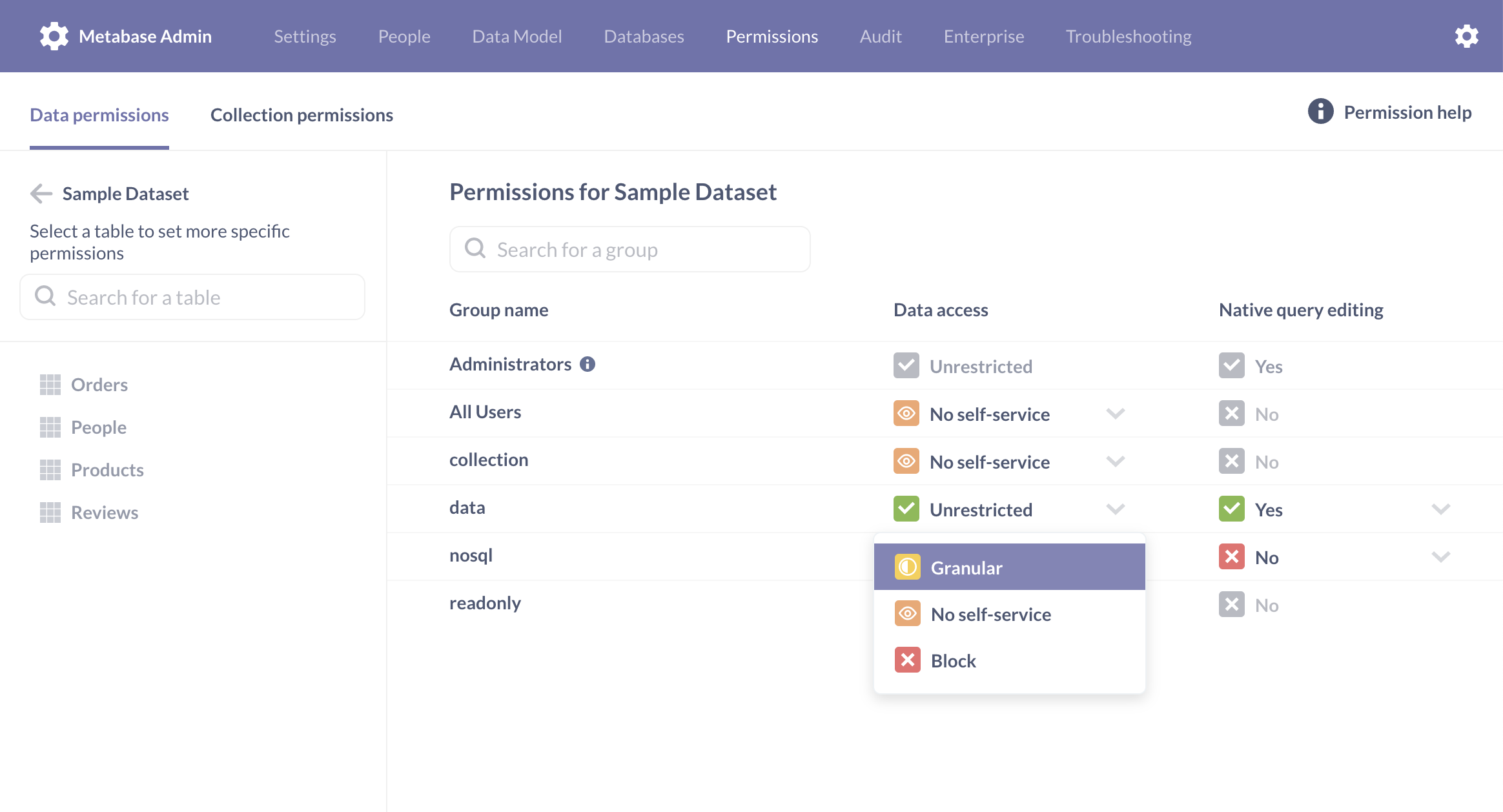
You can click on any cell in the table to change a group’s access level. When you’re done making your changes, just click the save changes button in the top-right, and you’ll see a confirmation dialog summarizing the changes.
Unrestricted access
Members of the group can access data from all tables (within all namespaces/schemas, if your database uses those), including any tables that might get added to this database in the future.
Granular access
Granular access allows administrators to explicitly set access to tables or schemas within a database. In practice, this means that:
- Admins can set the groups access to individual tables to either Unrestricted, No self-service, or Sandboxed access.
- If a new table gets added to this database in the future, the group won’t get access to that new table. An administrator would need to explicitly grant access to that table.
No self-service access
No self-service prevents people in a group from creating new ad hoc queries or questions based on this data, or from seeing this data in the Browse Data screen. Groups with this level of access can still see saved questions and charts based on this data in Collections they have access to.
Block access
Block access is only available on Pro and Enterprise plans (both self-hosted and on Metabase Cloud).
Block ensures people can’t ever see the data from this database, regardless of their permissions at the Collection level. So if they want to see a question in a collection that have access to, but that question uses data from a database that’s been blocked for that person’s group, then they won’t be able to see that question.
Keep in mind people can be in multiple groups. If a person belongs to another group that does have access to that database, that more privileged access will take precedence (overruling the block), and they’ll be able to view that question.
Native query editing
Members of a group with native query editing set to Yes can write new SQL/native queries using the native query editor. This access level requires the group to additionally have Unrestricted data access for the database in question, since SQL queries can circumvent table-level permissions. Members in groups without native query editing access can’t view, write, or edit SQL/native queries. People who are not in groups with native query editing permissions will still be able to view the results of questions created from SQL/native queries, but not the code itself. They also won’t see the “View the SQL” button when composing custom questions in the notebook editor.
Table permissions
When you select Granular access for a database, you’ll be prompted to set permissions on the tables (or schemas) within that database. Here you’ll have two or three options, depending on your Metabase plan.
Unrestricted access to the table
Groups with unrestricted access can ask questions about this table and see saved questions and dashboard cards that use the table.
No self-service access to the table
Groups with no self-service access to a table can’t access the table at all. They can, however, view questions that use data from that table, provided the group has access to the question’s collection.
Sandboxed access to the table
Only available in paid plans, Sandboxed access to a table can restrict access to columns and rows of a table. Check out data sandboxing.
Permissions and dashboard subscriptions
You don’t explicitly set permissions on dashboards subscriptions, as the subscriptions are a feature of a dashboard. Which means that What you can do j
If a person is in a group that has Curate access to the collection containing the dashboard, they can view and edit all subscriptions for the dashboard, including subscriptions created by other people. If a group has read-only access to a dashboard (based on its collection permissions), they can view all subscriptions for that dashboard. They can also create subscriptions and edit ones that they’ve created, but they can’t edit ones that other users created. (That last point is enforced by the BE only, the FE still needs to be updated to show the subscriptions as read-only.) If a group has no access to a dashboard, they can’t view any of its subscriptions, including ones that they may have created in the past, prior to having access revoked.
If you have read-only access to a dashboard, you can also unsubscribe yourself from a subscription that somebody else created via the new page in account settings.
A note about Pulses
If you’re using Pulses, we recommend switching to dashboard subscriptions.
Pulses act a bit differently with regard to permissions. When someone creates a new Pulse, they will only have the option to include saved questions that they have permission to view. Note, however, that they are not prevented from emailing that Pulse to anyone, or posting that Pulse to a Slack channel (if you have Slack integration set up), regardless of the recipients’ permissions. Unlike dashboards, where individual cards are blocked based on a person’s permissions, a Pulse will always render all of its cards.
Further reading
- Guide to data permissions.
- Data sandboxing: setting row-level permissions
- Advanced data sandboxing: limiting access to columns
Next: Collection permissions
Metabase lets you create and set permissions on collections of dashboards and questions. Learn how.
Read docs for other versions of Metabase.